Menus
Cinnamon Menu
The Cinnamon desktop includes its own menu that allows you to launch apps and configure Cinnamon. You can activate this menu by clicking the upper left corner or by pressing the Super key (usually the Windows key on most keyboards).
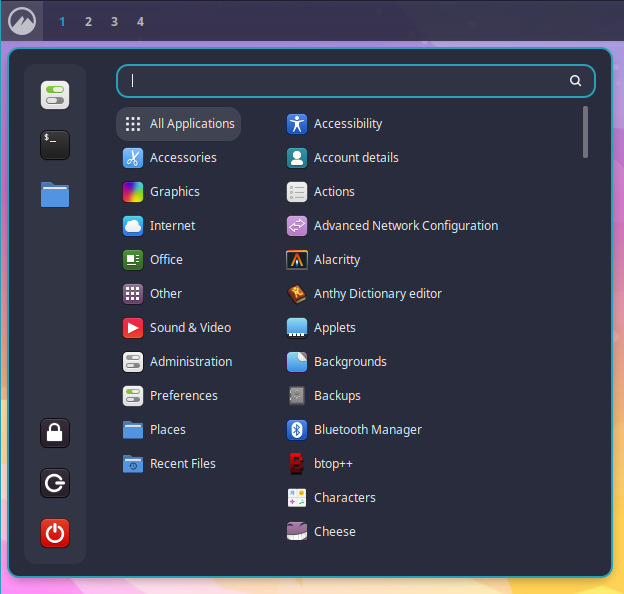
The Cinnamon menu includes an entry to launch the OhMyDebn menu.
OhMyDebn Menu
The OhMyDebn menu allows you to launch apps, learn about OhMyDebn, and configure and control the system. You can activate this menu from the Cinnamon menu or by pressing Super + Space.
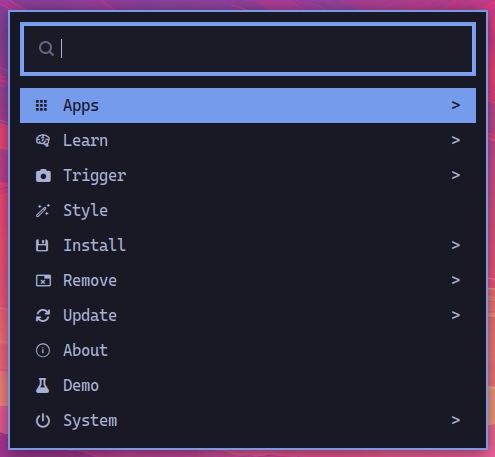
Once open, you can browse categories with the arrow keys or start typing to instantly search across every option in the menu, not just the current category. Categories that lead to a further submenu are marked with a > on the right.
The first option launches the separate Apps menu. The rest of the top level:
Learn- documentation links (see below)Trigger- screenshots, screen recording, a color picker, and the network and disk speed testsStyle- the theme carousel, tiling settings, and Cinnamon's effects, notifications, screensaver, windows, and workspaces settingsInstallandRemove- add or remove a package from your distro's repos (see below), a web app (a website wrapped as its own desktop app), or a terminal (TUI) appUpdate- update OhMyDebn, choose your update channel, run the doctor, update your firmware, and change your password or timezoneSetup- Bluetooth, defaults (your default AI assistant and browser), display, gestures, keybindings, keyboard, mouse, network, power, printers, and soundAboutandDemo- the system summary and animated logoSystem- lock, suspend, relaunch Cinnamon, restart, or shut down
Installing and removing packages
Install > Package and Remove > Package open a searchable list: every package your distro's repos offer, or every package that's installed. Type to search, press Tab to pick more than one, and Enter to go ahead. A preview below the list describes the highlighted package.
Removing shows everything apt will remove before it does anything (which can include other packages that depend on the ones you picked) and asks you to confirm. It removes the packages' system-wide settings too, not just the programs. Either way, the window tells you if the install or removal didn't finish.
Apps Menu
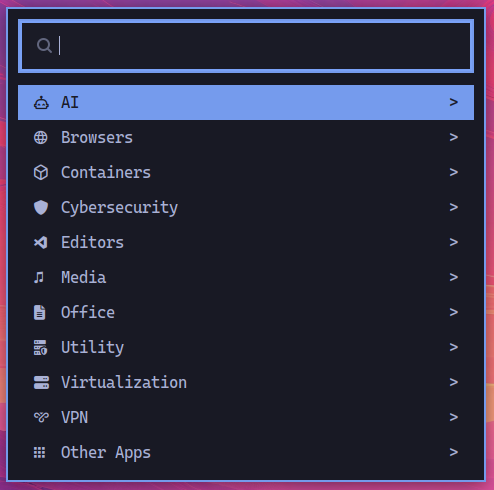
To run applications, you can select Apps from the OhMyDebn menu. You can then use arrow keys to select which application you'd like to run or start typing the first few letters of the application name.
Learn Menu
Select Learn from the OhMyDebn menu for quick links to documentation, opened in your browser:
- Keybindings (this site's hotkeys page)
- OhMyDebn (ohmydebn.org)
- Cinnamon
- Debian
- Neovim (LazyVim keymaps)
- Bash